TeaQL Showcase: See What Your Business Code Actually Does

Instead of hiding database behavior behind an opaque ORM, this demo shows the full execution path of a domain action:
Command → Domain transition → SQL → Audit diff → Event log → UI projection
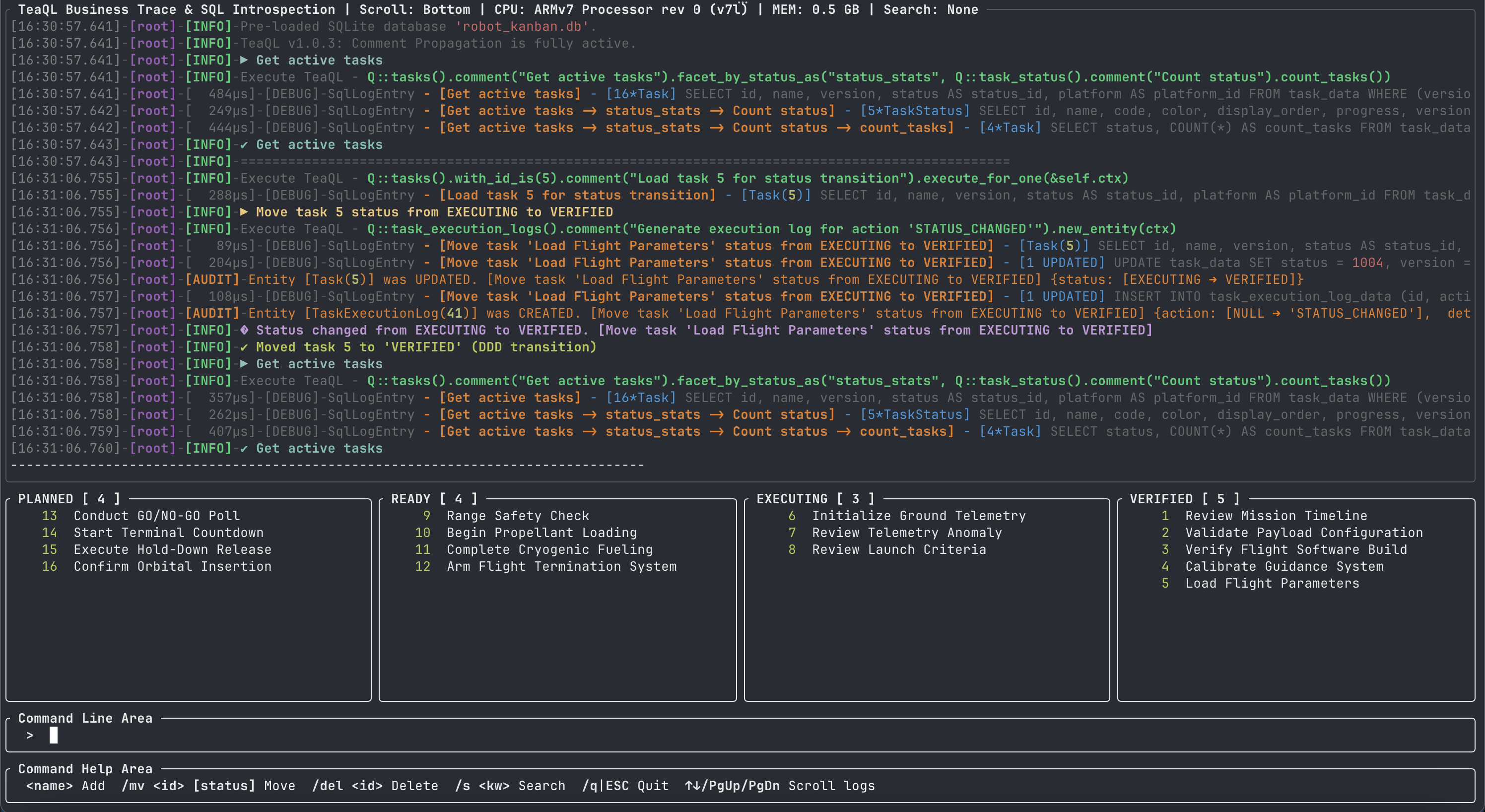
The task board intentionally uses a tiny domain model so the runtime behavior is easy to follow. TeaQL itself is designed for significantly larger business domains, where understanding domain transitions, generated SQL, audit trails and query execution paths becomes even more important.
To make the idea concrete, we built a terminal-based Kanban board using Ratatui + SQLite. When you move a task from Planned to Ready, TeaQL shows the generated SQL, optimistic concurrency update, audit trail, lifecycle event, and refreshed status facets — all in real time.
The app also cross-compiles as a standalone statically linked binary for armv7 router environments, with no external runtime dependencies.
✨ Powered by native rusqlite: The TeaQL code generator natively supports rusqlite, producing 100% Rust-native SQLite execution code that compiles directly into your binary with zero external driver overhead.
Try it instantly in two ways:
- Hosted SaaS demo: open the multi-tenant Robot Task Board at lab-robot-task-board-rust.teaql.io. The hosted version is designed as a SaaS-style multi-tenant deployment, so different tenants can try the same TeaQL-powered task board without sharing one local database instance.
- Local Docker demo: run the server locally when you want to inspect the runtime behavior on your own machine.
docker run --rm -it teaql/robot-task-board:minimal
The demo app source is available at teaql/robot-task-board.
TeaQL for Rust
TeaQL is coming to Rust.
We have now open-sourced the Rust-based TeaQL generator and runtime foundation. You can find the source code at teaql/teaql-forge-rs.
For a faster hands-on experience, run the server directly with Docker:
docker run -d --name teaql-forge-server -p 8080:8080 teaql/teaql-forge-rs:latest
The project is still in its early stage. Our goal is to explore how TeaQL's domain query model can work naturally in Rust, and how it can help developers build domain-driven business applications with clearer models, safer queries, and better local tooling.
The early open-source line will focus on:
- a lightweight TeaQL generator for Rust
- basic domain model definitions
- query model and request structures
- runtime foundation for local execution
- simple examples and demo applications
- a developer-friendly project structure for the Rust ecosystem
This project is not intended to be a large framework from day one. We want to start small, make the basic ideas clear, and let developers understand how TeaQL can fit into Rust projects naturally. The early version will focus on clarity, simplicity, and practical usage.
Rust is a good fit for TeaQL's next step because it provides strong type safety, high performance, local-first deployment, single-binary distribution, good support for CLI and developer tools, and a growing ecosystem for business and infrastructure software.
TeaQL for Rust is an open-source Rust-based direction for TeaQL, starting with a lightweight generator and runtime foundation for building domain-driven business applications.
For this task board demo, the TeaQL runtime crates, generated Rust code, and Rust-focused generator foundation are open source. The source code is available at teaql/teaql-forge-rs, and the Docker image above gives you the quickest way to try the server.
📁 Project Structure
robot-task-board/
├── src/
│   ├── app.rs           # Core Application State
│   ├── commands.rs      # User command parsing (`/add`, `/mv`, etc)
│   ├── logging.rs       # TeaQL Audit Sink & Logging extensions
│   ├── main.rs          # Event loop & application entry point
│   ├── models.rs        # Lightweight models & DTOs for the UI
│   ├── service.rs       # Domain behavior, Aggregate Roots & TeaQL queries
│   ├── startup.rs       # Animated startup / bootstrap rendering
│   ├── tui.rs           # Terminal initialization and restoration
│   ├── ui.rs            # Ratatui layout, syntax-highlighted log rendering
│   └── utils.rs         # System info (CPU/memory) from /proc
├── models/
│   └── model.xml        # Generated by AI via teaql-agent-kit (https://github.com/teaql/teaql-agent-kit), validated & auto-healed via the `teaql eval` command
├── generate-lib/
│   └── lib/             # Auto-generated TeaQL domain library (Generated via `teaql gen-lib models/model.xml`)
├── Cargo.toml
└── README.md
🔬 Why TeaQL? (10 Applied Scenarios)
This application exercises 10 distinct TeaQL capabilities across its CRUD and query workflows. Each scenario below maps a TeaQL API to its concrete usage in this app and the exact SQL it produces.
Scenario 1: Schema Bootstrap (ensure_rusqlite_schema_for)
What it does: Automatically creates or migrates all database tables and seeds initial reference data (status values, platform) from the domain model — zero manual SQL.
// service.rs — One-line schema setup
let mut ctx = robot_kanban::module_with_behaviors_and_checkers().into_context();
ctx.use_rusqlite_provider(inner_executor.clone());
ensure_rusqlite_schema_for(&ctx)?;
Applied in: TaskService::new() — on first run, creates task_data, task_status_data, and platform_data tables with seed data; on subsequent runs, applies any schema changes from the model.
Bonus (Sample Data): Beyond schema creation, the framework also auto-generates a
sample_datamodule from your model. This allows developers to inject structured, type-safe mock entities with a single function call for rapid prototyping and unit testing, without writing a single rawINSERTstatement:
Scenario 2: JSON-Based Dynamic Filtering (filter_with_json)
What it does: Accepts a JSON object to dynamically construct WHERE clauses at runtime. An empty {} acts as a wildcard (no filter), enabling a single code path for both search and full-load.
// service.rs — Unified search/load query
let search_json = if let Some(ref term) = search_term {
    let escaped_name = serde_json::Value::String(term.clone());
    format!(r#"{{"name": {}}}"#, escaped_name)   // → {"name": "calibrate"}
} else {
    r#"{}"#.to_owned()                            // → {} (wildcard)
};

let select = Q::tasks().filter_with_json(&search_json);
| Input | JSON | Generated SQL |
|---|---|---|
| No search | {} | SELECT ... FROM task_data WHERE (version > 0) |
calibrate | {"name": "calibrate"} | SELECT ... FROM task_data WHERE (version > 0) AND (name LIKE '%calibrate%') |
Applied in: /search or /s command — filters the Kanban board in real-time.
Scenario 3: Faceted Aggregation (facet_by_status_as)
What it does: Attaches a sub-query that computes aggregate counts grouped by a relation (status), all within a single database round-trip alongside the main entity query.
// service.rs — Single query fetches tasks + status counts
let select = Q::tasks()
    .comment(search_comment)
    .filter_with_json(&search_json)
    .facet_by_status_as("status_stats",
        // This sub-query could easily be extracted into a semantic helper method
        // e.g. `TaskStatusRequest::build_count_stats()` for reuse across the app
        Q::task_status().comment("Count status").count_tasks()
    );

let all_tasks = select
    .comment("Query tasks").purpose("Load data").execute_for_list(&self.ctx).await?;

// Access facet results from the same SmartList
if let Some(facet_list) = all_tasks.facet("status_stats") {
    for record in facet_list.iter() {
        let status_id = record.get("id");
        let count = record.get("count_tasks");
    }
}
💡 Pro Tip (Semantic Encapsulation): Notice how
Q::task_status().count_tasks()is passed directly. Because TeaQL queries are strongly-typed data structures, you can effortlessly extract these aggregations into reusable, semantic helper methods.This allows you to compose massive, multi-layered TeaQL queries dynamically without polluting your business logic. (Note: The
E::Expression API provides the exact same composability for field-level conditions and evaluations!)
Generated SQL (3 queries in one round-trip):
-- 1. Main entity query
SELECT id, name, version, status AS status_id, platform AS platform_id
  FROM task_data WHERE (version > 0)
-- 2. Facet: load status reference data
SELECT id, name, code, color, display_order, progress, version FROM task_status_data WHERE (version > 0)
-- 3. Facet: aggregate task counts per status
SELECT status, COUNT(*) AS count_tasks
  FROM task_data WHERE (version > 0) AND (version > 0) AND (status IN (1, 1001, 1002, 1003, 1004)) GROUP BY status
Applied in: Board reload — the Planned/Process/Done count badges and task lists are all populated from this single query.
Scenario 4: Entity Factory (Q::tasks().comment("Create tasks").new_entity())
What it does: Creates a new entity instance pre-wired with the runtime context, ready for field population and persistence.
// task/logic.rs — Encapsulated factory method with DDD validation
impl Task {
    pub fn create(cmd: &CreateTaskCommand, next_id: u64, ctx: &UserContext) -> Result<Self, AppError> {
        let mut task = Q::tasks().comment("Create tasks").new_entity(ctx);
        task.update_id(next_id)
            .update_name(cmd.name.clone())
            .update_version(1_i64)
            .update_status_to_planned()  // Safe API: raw update_status_id(1) is blocked by the compiler
            .update_platform_id(1_u64);
        Ok(task)
    }
}
Generated SQL:
INSERT INTO task_data (id, name, version, status, platform)
  VALUES (1, 'calibrate sensor', 1, 1, 1)
Applied in: bare input <name> or /add command — creates a new task in Planned status.
Scenario 5: ID Space Generation (RusqliteIdSpaceGenerator)
What it does: Generates globally unique, monotonically increasing IDs per entity type using a dedicated SQLite sequence table — no auto-increment column needed.
// service.rs — add_task()
let next_id = self.ctx.next_id_for::<Task>()?;
Applied in: bare input <name> or /add command — each new task receives a unique ID from the Task ID space.
💡 Pro Tip: The Universal
UserContextNotice how we retrieve the ID generator fromself.ctx? TheUserContextobject is pervasive throughout your application's domain layer and request lifecycle. Because it is visible everywhere, it acts as the perfect dependency injection container.You can integrate any external resources directly into
UserContext, such as:
- Redis caching layers
- External API clients
- Email / SMS service clients
- Internationalization (i18n) resources
Simply use
ctx.insert_resource(...)at initialization, and use extension traits to expose type-safe, domain-specific methods anywhere in your business logic.
Scenario 6: Domain Behavior & Cascading Save (DDD Aggregate Root)
What it does: Allows attaching rich domain logic directly to generated entities using Rust's Native Extension Traits, and securely saving the entire Aggregate Root graph in a single atomic transaction.
// service.rs — Executing a DDD behavior
let mut task = Q::tasks().comment("Query tasks").purpose("Load data").with_id_is(id).comment("Query task_status").purpose("Load data").execute_for_one(&self.ctx).await?;

// 1. Invoke pure domain method (updates internal state)
let next_status = task.transition_status(&cmd)?;

// 2. Generate a child log entity via domain behavior
let log = task.generate_execution_log("STATUS_CHANGED", &detail, &self.ctx);

// 3. Attach the child to the Aggregate Root's collection
task.task_execution_log_list_mut().push(log);
task.set_comment("Move task status");

// 4. Graph persistence: Recursively saves the Task AND inserts the new child Log!
task.save(&self.ctx).await?;
Applied in: /mv command — enabling clean, expressive state mutations directly on Task objects.
Scenario 7: Partial Projections & Aggregations (return_type::<T>())
What it does: Tells TeaQL to deserialize query results into a custom data transfer object (DTO) instead of the default generated entity. This is vital when executing partial selects or complex groupings where the returned shape no longer matches the full entity.
// Define a custom DTO for aggregations or partial fields
#[derive(TeaqlEntity)]
pub struct StatusStats {
    pub status: i32,
    pub task_count: i64,
}

// Fetch custom projection instead of raw Task
let stats = Q::tasks().select_status()
    .count_id_as("task_count")
    .group_by_status()
    .return_type::<StatusStats>()
    .comment("Query tasks").purpose("Load data")
    .execute_for_list(&ctx).await?;
Applied in: High-performance dashboard rendering — avoids full-entity deserialization overhead when projecting lightweight summaries or grouped counts.
Scenario 8: Audited Soft-Delete (mark_as_delete)
What it does: Deletes an entity using the rich domain object rather than raw IDs. By chaining mark_as_delete() and set_comment() directly on the entity, TeaQL enforces optimistic concurrency (via the entity's current version) and gracefully propagates the deletion context to the EntityEventSink for audit logging.
// service.rs — delete_task()
let task_name = task.name().to_string();
task.mark_as_delete().set_comment(format!("Delete task '{}'", task_name));
task.save(&self.ctx).await?;
Generated SQL:
UPDATE task_data SET version = -2 WHERE id = 1 AND version = 1
TeaQL uses a soft-delete pattern — version is set to a negative value rather than removing the row, preserving audit history.
Applied in: /del command.
Scenario 9: Comment Chain Propagation (.comment())
What it does: Attaches human-readable intent annotations to queries. When queries have nested sub-queries (e.g., facets), comments propagate down the chain with -> separators, creating a full trace of query intent.
// service.rs — Comments propagate through facet sub-queries
let select = Q::tasks()
    .comment("Get active tasks")                       // Parent comment
    .filter_with_json(&search_json)
    .facet_by_status_as("status_stats",
        Q::task_status().comment("Count status")       // Child comment
            .count_tasks()
    );
Resulting log trace chain:
[Get active tasks]                                → main task query
[Get active tasks->status_stats->Count status]    → facet status lookup
[Get active tasks->status_stats->Count status]    → facet aggregate count
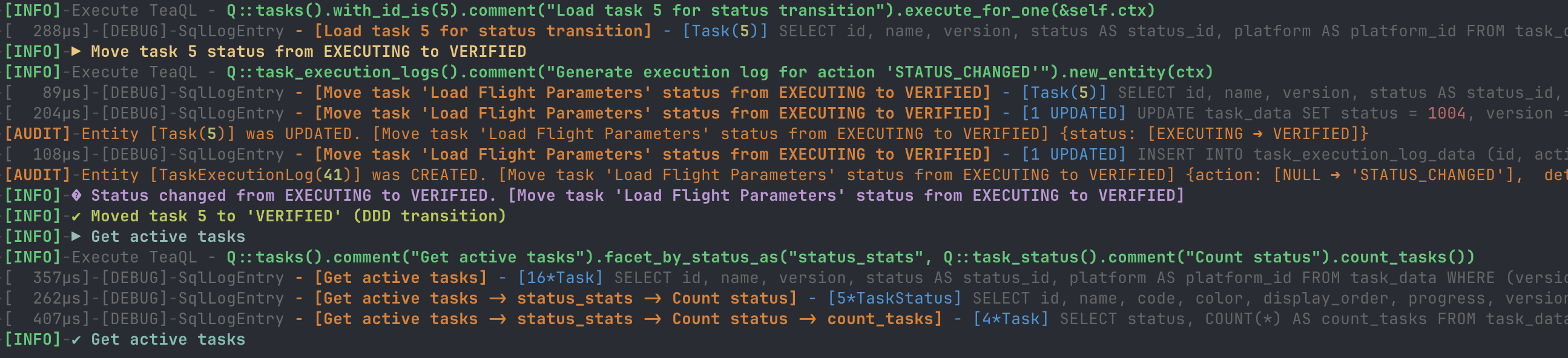
The TUI renders these traces in real-time with syntax-highlighted colors — timestamp, user context ([philip]), comment chains, result summaries, and elapsed times are each distinctly colored:
[12:06:00.225]-[philip]-[0.184ms]-[DEBUG]-SqlLogEntry - [Get active tasks] - [5*Task] SELECT ...
[12:06:00.226]-[philip]-[0.138ms]-[DEBUG]-SqlLogEntry - [Get active tasks->status_stats->Count status] - [3*TaskStatus] SELECT ...
Applied in: Every query in the application — enables real-time SQL auditing from the TUI log panel.
Scenario 10: Entity Audit Subsystem (EntityEventSink)
What it does: TeaQL automatically hooks into the persistence lifecycle to track fine-grained Entity Events (Create, Update, Delete, Recover) and computes precise field-level diffs (old_value ➔ new_value).
// logging.rs — Implement the sink to intercept framework audit events
pub struct AppAuditSink;

impl EntityEventSink for AppAuditSink {
    fn on_event(&self, ctx: &UserContext, event: &EntityEvent) -> Result<(), RuntimeError> {
        let user = short_user(ctx);
        // ... format changes and output to TUI Log Area and app.log
        for change in &event.changes {
            let detail_line = format!(
                "[{}]-[{}]-[AUDIT]-  -> Field [{}]: {} ➔ {}",
                timestamp, user, change.field, change.old_value, change.new_value
            );
        }
        Ok(())
    }
}

// Attach it during runtime initialization
ctx.set_event_sink(AppAuditSink);
Resulting log output:
[12:04:23.529]-[philip]-[AUDIT]-Entity [Task(1)] was UPDATED. [Move task 'My New Task' status from PLANNED to READY]
[12:04:23.529]-[philip]-[AUDIT]-  -> Field [status]: PLANNED ➔ READY
[12:04:23.529]-[philip]-[AUDIT]-  -> Field [version]: 1 ➔ 2
[12:04:23.530]-[philip]-[AUDIT]-Entity [TaskExecutionLog(2)] was CREATED. [Move task 'My New Task' status from PLANNED to READY]
Next Steps / Coming Soon:
In the next phase, we will introduce the audit ignore feature. By adding an attribute in the model.xml, developers will be able to explicitly exclude sensitive data (like passwords, PII, or internal tokens) from being captured or diffed by the audit subsystem.
Scenario Summary
| # | TeaQL API | App Feature | Command |
|---|---|---|---|
| 1 | ensure_rusqlite_schema_for | Auto-create tables & seed data | Startup |
| 2 | filter_with_json | Dynamic search / wildcard load | /s |
| 3 | facet_by_status_as | Status count aggregation | Board reload |
| 4 | Q::tasks().comment("Create tasks").new_entity() | Create task with defaults | <name> |
| 5 | RusqliteIdSpaceGenerator | Unique ID generation | <name> |
| 6 | Extension Traits | Domain Behavior Injection (DDD) | /mv, /del |
| 7 | .return_type::<T>() | Custom partial projection & stats DTOs | Optimization |
| 8 | EntityStatus::UpdatedDeleted | Audited soft-delete with concurrency | /del |
| 9 | .comment() | Query intent tracing | All queries |
| 10 | EntityEventSink | Field-level lifecycle diffs & Audit | All mutations |
📐 Architecture
3-Layer Separation
| Layer | File | Responsibility |
|---|---|---|
| UI / Presentation | ui.rs, startup.rs, tui.rs | Ratatui layout, startup animation, log syntax highlighting, terminal management |
| Application Layer | main.rs, app.rs, commands.rs | App state, command parsing, event loop orchestration |
| Service & Domain | service.rs, logging.rs, models.rs | TeaQL queries, DDD aggregate roots, audit sinks, view models |
main.rs has no direct dependency on TeaQL types — it only interacts with TaskService, TaskModel, and MoveResult.
DDD Aggregate Root
Generated Task entities act as Data Transfer Objects but are extended with native impl Task methods to encapsulate business logic:
Task::create()— factory method with validationTask::transition_status()— automatic next-status resolutionTask::generate_execution_log()— encapsulation of internal event generation
Domain Model
Defined in models/model.xml, the TeaQL domain model declares two entities with a status relation:
<task_status
    name="Planned|Ready|Executing|Verified"
    code="PLANNED|READY|EXECUTING|VERIFIED"
    _features="status"
    _identified_by="code" />

<task
    name="Task Name|[1,200]"
    status="task_status()"
    _features="custom" />
🤖 Taming AI via Service-Generated APIs
A hidden paradigm shift in this architecture is how naturally it tames AI coding assistants. The workflow forms a highly predictable closed loop:
- AI Generation: An AI easily drafts the declarative domain model (
model.xml) from raw business requirements. To automate this process entirely, we built the teaql-agent-kit. - Translation Service: A dedicated background service takes this model and translates it into a dense, strictly-typed Rust API layer.
- High-Obedience Implementation: When the AI helps you write application logic, it relies entirely on these generated, compiler-enforced APIs.
This generated layer acts as an absolute guardrail against common AI hallucinations:
- Safe Setters (No Magic Numbers): Instead of
task.update_status_id(1)(which is natively blocked by the compiler), the AI is forced to use the semantictask.update_status_to_planned(). It cannot hallucinate invalid foreign keys. - Safe Getters (The
E::Expression API): Deeply nested or nullable data retrieval in Rust often causes AI to write buggy.unwrap()chains. TeaQL provides a monadic expression API:The AI gets perfect auto-completion for legitimate fields (use robot_kanban::E;// Safe optional-chaining: swallows nulls gracefully and eliminates type mismatchlet name = E::task_status(status).get_name().eval().unwrap_or(raw_str);.get_name()) and produces zero runtime panics.
🛠 Commands
Commands use a slash (/) prefix. Any bare text (without a slash) is treated as a quick-add for a new task.
| Command | Shortcut | Description | Example |
|---|---|---|---|
<name> / /add <name> | — | Create a new task in Planned status | calibrate sensor or /add calibrate |
/move <id> [status] | /mv | Transition task status (planned/ready/executing/verified; default: next) | /move 3 or /mv 3 ready |
/search <keyword> | /s | Filter tasks by keyword (empty to clear) | /search calibrate or /s |
/delete <id> | /del | Permanently delete a task | /delete 3 |
/exit / /quit | /q | Quit the application | /exit |
| — | ESC | Immediate exit | — |
| — | Up/Dn | Scroll Action Logs viewport | — |
⚙️ Prerequisites
- Rust toolchain (1.70+)
- TeaQL Runtime Packages — the following crates are expected to be available (e.g., via relative path or git submodule):
teaql-core,teaql-runtime,teaql-macros,teaql-sql,teaql-provider-rusqlite
A Note on Open Source: The TeaQL Rust generator and runtime foundation are now open source at teaql/teaql-forge-rs. For a faster experience, you can also run
docker run -d --name teaql-forge-server -p 8080:8080 teaql/teaql-forge-rs:latestand try the server directly.
- For cross-compilation:
cargo-zigbuildand thearmv7-unknown-linux-musleabihftarget
Note: TeaQL runtime crates are published on crates.io. No local checkout is needed —
cargo buildwill fetch them automatically.
🚀 Build & Run
Local Development
# Check compilation
cargo check

# Run the TUI
cargo run

# Run the TUI in compact mode (hides the SQL log area)
cargo run -- -c

# Build optimized release binary
cargo build --release
ARMv7 Cross-Compilation
# Static cross-compile for armv7 routers
cargo zigbuild --release --target armv7-unknown-linux-musleabihf
The output binary is at target/armv7-unknown-linux-musleabihf/release/robot-task-board — upload directly to a router and run with zero dependencies.
Running Tests
cargo test
Tests cover:
- Comment propagation — verifies TeaQL comment chains propagate through facet sub-queries
- CRUD lifecycle — add → reload → verify → delete → verify
- DDD transitions — Planned → Ready → Executing → Verified with automatic and explicit status moves
💬 What We'd Love Feedback On
We're building TeaQL because we believe developers shouldn't have to choose between clean Domain-Driven Design and raw SQL performance/visibility.
If you try out this Kanban board or look at the code:
- Does the query tracing (
.comment()) actually help you understand what the app is doing? - How do you feel about defining your domain in
model.xmlvs writing Rust structs directly? We'd love your thoughts on the DX of declarative modeling. - Upcoming Feature: We are working on an
audit ignoreattribute to exclude PII/sensitive data from theEntityEventSink. How do you currently handle this in your stack?
Drop a comment on HN, open an issue, or reach out!
(P.S. TeaQL was originally born out of our need to manage complex workflows and data at scale. Check out the framework behind this at teaql.io — if you're building physical infra or complex business logic, come say hi!)